


Activity

W

Shipped this project!

I built Imprint, a browser fingerprinting tool using pure HTML, CSS, and JS! It works completely client-side, so no data is saved, and you can view information about more than 15 different metrics exposed by your browser. You can export this information as a .json file, and you are also given automatically generated
suggestions on how to prevent being profiled.
There are also modals for the legal policy, changelog, and feedback form. You can also click on any of the metrics to copy them to the clipboard!

W

I split my html file up into HTML, CSS, and JS files. I also updated the changelog, and finally finished work on all the necessary aria accessibility information.

Attachment
0
W

I added a download fingerprint button, as well as continuing to improve the aria accessibility.

Attachment
0
W

I updated the accessibility of the website, as well as updating the share functions, fixing minor bugs, and filling out the needed information on the GitHub page.

Attachment
0
W

I added a MIME type fingerprinting vector, as well as updating some of the styling of the modals.

Attachment
0
W

I added modals for my legal disclaimer, changelog, and a feedback form. Dark mode responsive too :)

Attachment
0
W

I implemented a dark mode by converting every colour in my CSS to a variable, and using JavaScript to selectively apply a dark mode class to the root element based on media preference queries.

Attachment
0
W

I added accessibility and CSS support vectors, as well as refactoring some background CSS work.

Attachment
0
W

I added three different screen colour and display metrics, and began some background preparation for new metrics in the future.

Attachment
0
W

I added a suggestions section with automatically generated recommendations on how to fix your fingerprint and prevent tracking.

Attachment
0
W

I added canvas and audio metrics.

Attachment
0
W

I added a bunch more metrics, such as GPU, fonts, RAM, and touchpoints.

Attachment
0
W

I made the base website and styling, and created a unique hash generator based on the first metric; which reviews your screen size and dpr.

Attachment
0
W

Shipped this project!

Hours: 2.27
Cookies: 🍪 34
Multiplier: 15.13 cookies/hr

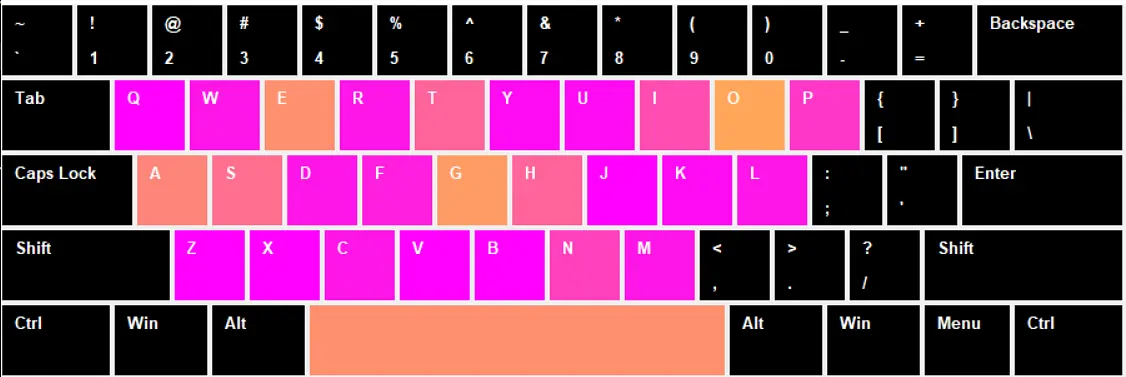
I built a live keyboard heatmap that shows which keys are being pressed in real time!

It works by tracking every key press and coloring each key from green to red depending on how often it’s pressed. Watching your own typing habits light up the keyboard is super satisfying.

I learned a lot about Tkinter GUIs, real-time event handling, and making Python apps and executables that are small enough to share. It was tricky to get everything working in such a small file size, but it turned out really fun!

Anyway, it’s colorful, and was an enjoyable experience to make, and hopefully it gives people a fun way to see their typing patterns! :D

W

I tried to use pyinstaller to package my program up into an executable, but it was 33MB, which was too big for github. :( So I had to make my own gradient and normalize function so that I could get the file size down to 11MB and upload it to github.

Attachment
0
W

Using tkinter and matplotlib, I was able to make the heatmap window to show the usage.
The “s” was just for the screen shot, but see if you can guess what I typed just by looking at the other letters. :)

(Hint: If you’ve done coding, then you’ve definitely typed it before)

(answer below)

Attachment
0
W

I made the base script that tracks your key presses and records them to a text file.

Attachment
0
W

I made the base calculator that takes your push-up max and figures out how many pushups you need to do each day.

Attachment
0