3 devlogs
2h 16m 21s
A downloadable executable built from a python script that generates a heatmap of your keyboard based on your usage frequencies.
A downloadable executable built from a python script that generates a heatmap of your keyboard based on your usage frequencies.
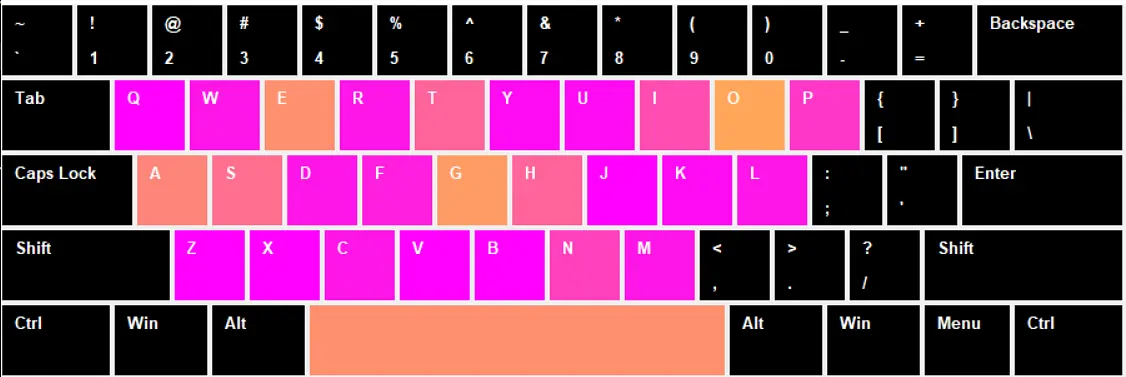
I built a live keyboard heatmap that shows which keys are being pressed in real time!
It works by tracking every key press and coloring each key from green to red depending on how often it’s pressed. Watching your own typing habits light up the keyboard is super satisfying.
I learned a lot about Tkinter GUIs, real-time event handling, and making Python apps and executables that are small enough to share. It was tricky to get everything working in such a small file size, but it turned out really fun!
Anyway, it’s colorful, and was an enjoyable experience to make, and hopefully it gives people a fun way to see their typing patterns! :D
I tried to use pyinstaller to package my program up into an executable, but it was 33MB, which was too big for github. :( So I had to make my own gradient and normalize function so that I could get the file size down to 11MB and upload it to github.

Log in to leave a comment
Using tkinter and matplotlib, I was able to make the heatmap window to show the usage.
The “s” was just for the screen shot, but see if you can guess what I typed just by looking at the other letters. :)
(Hint: If you’ve done coding, then you’ve definitely typed it before)
(answer below)

Log in to leave a comment
I made the base script that tracks your key presses and records them to a text file.

Log in to leave a comment