Leukocoria_Detector banner

Leukocoria_Detector

2 devlogs
2h 37m 35s

This project is an end-to-end exploration of object detection using YOLO, built on a custom dataset and trained from scratch through a carefully designed pipeline. It captures the process of turning raw labeled data into a working detection model, focusing on practical challenges such as data preparation, training stability, and real-world inference. The project serves as both a functional model and a learning-driven implementation of modern computer vision techniques.

Loading README...

Khaled Wael

The “Silence isn’t Golden” Patch
The Mission: Fixing the AI’s social skills. The Reality: Even a life-saving AI needs to learn how to say “All good!” instead of just staring back in silence.

🤫 The Problem: The “Shy” AI
After the initial 150-minute sprint, the model was terrifyingly accurate at spotting Leukocoria. But it had one major flaw: if it saw a healthy eye, it just… stayed quiet. No boxes, no text, nothing. To a user, it looked like the server had gone on a coffee break. In the world of UX, silence is a bug, not a feature.

🛠️ The “Status Update” Overhaul
I jumped back into the code to give the AI a voice.

Breaking the Canvas: Instead of trying to squeeze text onto the image (and potentially blocking the face), I decided to create a dedicated HTML status zone.

Going Bold (900 Weight Bold): I wanted the “Clear” message to be unmistakable. We’re talking a neon-green, 900-weight, extra-large “Not Affected - Clear! ✨” message that pops up right below the image container.

Smart UI Logic: Now, the system is proactive. If it finds a prediction, it draws the boxes. If the list is empty, it instantly triggers the “Clear” status and turns the border green to give the user that instant sigh of relief.

👻 Ghost in the Machine (The Cache Battle)
The biggest headache wasn’t the logic; it was the browser’s memory. GitHub Pages was “gaslighting” me—I’d push the new code, but the browser would keep running the old version from its cache. After a few rounds of Hard Refreshes (Ctrl + F5), the new UI finally came to life.

Check out the improved, more vocal version here: 🔗 https://khaled-dragon.github.io/Leukocoria_Detection/

Attachment
0
Khaled Wael

Shipped this project!

Hours: 1.45
Cookies: 🍪 11
Multiplier: 7.45 cookies/hr

I built Leukocoria AI, a full-stack web application designed for the early detection of “White Eye” (Leukocoria) in children. It’s powered by a custom-trained YOLO11 model that can identify warning signs from a simple eye photo in seconds. It’s not just code; it’s a potential life-saver that I brought to life from scratch.

It was a wild 2.5-hour sprint, but here’s the breakdown:

The Invisible Grind: Before the timer even started, I spent hours in the “labeling mines” on Roboflow, hand-drawing boxes around eyes to make the model smart. Data labeling is the unsung hero of AI!

The Brain: I trained a YOLO11 model to recognize the specific reflections associated with Leukocoria.

The Nervous System: A Node.js backend hosted on Hugging Face Spaces (Dockerized!) acting as the bridge between my model and the world.

The Face: A sleek, neon-themed frontend built with Tailwind CSS and hosted on GitHub Pages. When you upload a photo, the frontend pings my API, the model does its magic, and boom—instant results with bounding boxes and confidence scores!

What did i learn???
Oof, this project was a masterclass in “Trial and Error”:

The 404 Boss Fight: I learned that GitHub Pages is very picky about file structures. Moving everything to the Root directory and fixing paths was a puzzle that felt amazing to solve.

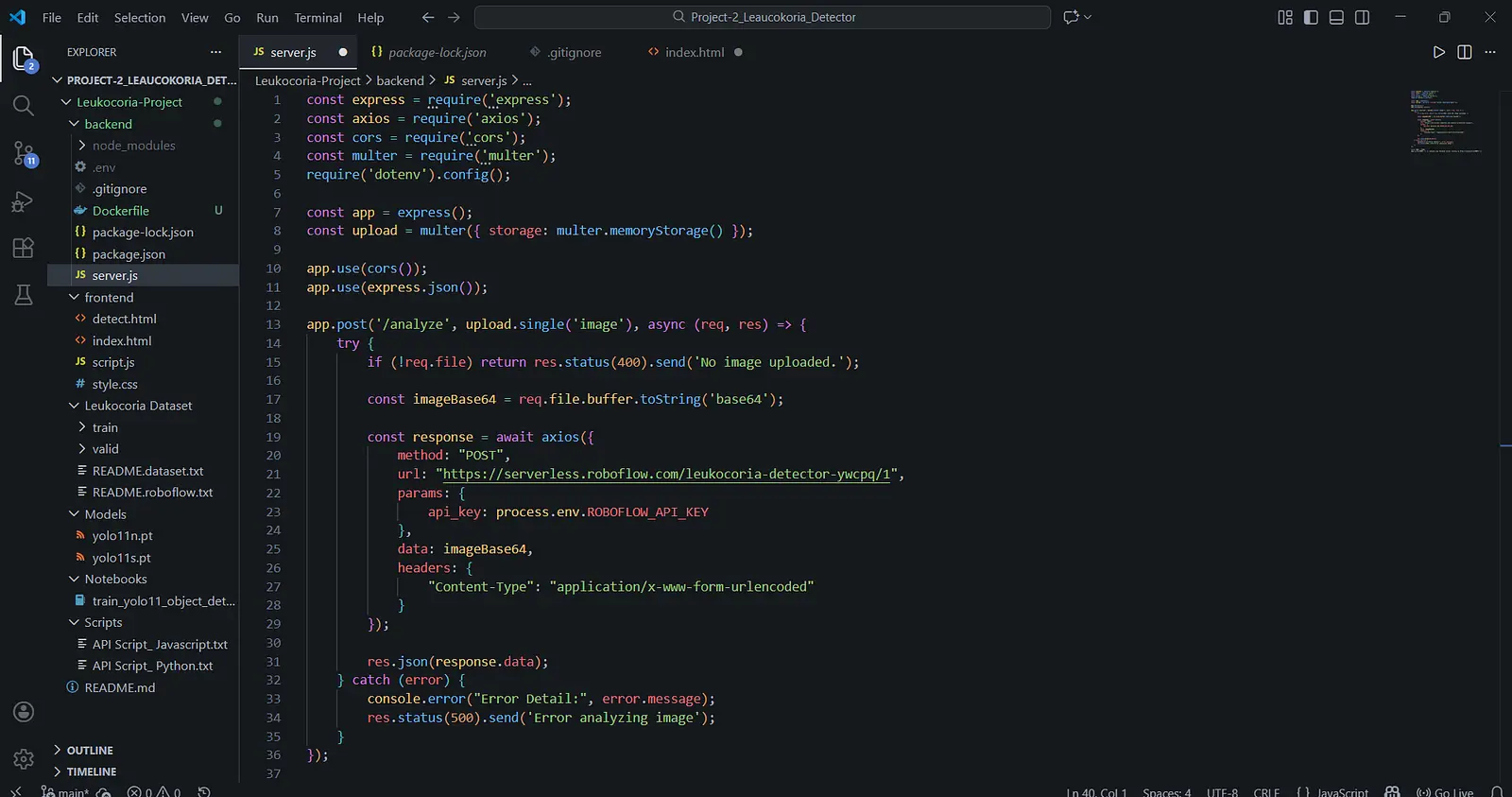
Bridge Building: Getting a frontend on GitHub to talk to a backend on Hugging Face taught me a TON about CORS, environment secrets, and API connectivity.

The “Full-Stack” Reality: It’s one thing to train a model in a notebook; it’s a whole different beast to deploy it as a living, breathing web app.

Khaled Wael

How I Built a Life Saving AI in 2.5 Hours (And Kept My Sanity)
The Mission: Early detection of Leukocoria (White Eye) using YOLO11. The Reality: A battle against 404 errors, Docker files, and “Why is the backend not talking to the frontend?!”

👁️ Phase 0: The “Invisible” Grind (Data Labeling)
Before the timer even started, there was the “Zen Garden” of AI: Data Labeling. I spent hours meticulously drawing boxes around eyes in Roboflow. It’s the kind of work that doesn’t show up in the final commit history, but it’s the soul of the model. If the AI is smart today, it’s because I was patient yesterday.

🏗️ The 150-Minute Sprint
Once the data was ready, the real chaos began:

The Brain (The Model): Trained a YOLO11 model to spot Leukocoria with terrifying accuracy.

The Nervous System (Node.js Backend): Built a server to handle image uploads and talk to the Roboflow API.

The Home (Hugging Face): I didn’t want a “sleepy” server on Render, so I moved to Hugging Face Spaces using Docker. Seeing “Server is running on port 7860” felt better than a warm pizza.

The Face (The Frontend): A sleek, dark-mode UI using Tailwind CSS. It looks like something out of a sci-fi movie.

🛠️ The “404” Boss Fight
Most of my time was spent playing “Where’s Waldo?” with my file paths. GitHub Pages was convinced my files didn’t exist, and my index.html was playing hard to get. After a few rounds of moving files to the Root and fixing fetch URLs, the bridge was finally built.

🏁 Final Result
A fully functional, live AI application that can literally save lives by detecting eye issues from a simple photo.

Model: YOLO11 🎯

Backend: Node.js on Hugging Face ☁️

Frontend: HTML/JS on GitHub Pages 💻

Total Dev Time: 2.5 Hours (Plus a lifetime of labeling eyes).

Check it out here: https://khaled-dragon.github.io/Leukocoria_Detection/frontend/index.html
Attachment
Attachment
Attachment
0