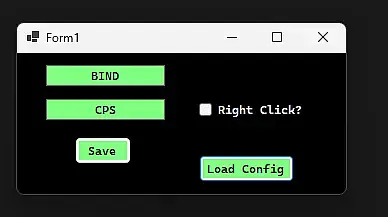
Shipped this project!
Whis is final project if you want to use it you have to compile ;)
#4 Devlog - Final
I made everyting work. i made config and save button work and you can now add config or save it from other people. this is end of the project you can download it on my github ;)

0
Log in to leave a comment
#3 Devlog - Working UI
In this devlog, I focused on making the UI I created earlier fully functional.
Everything is working exactly as intended — the clicker can register up to 50 clicks per second without any issues.
The only thing I still need to improve in the next devlog is adding user configuration support, allowing users to save their own configs.
Aside from that, everything will be finished and ready.
0
Log in to leave a comment
#2 Devlog - UI
in this devlog i made simple ui for the project ;)

0
Log in to leave a comment
#1 Devlog – C# AutoClicker
This is a simple auto clicker written in C# using Windows API.
It runs in the console and allows the user to set a global hotkey that toggles left mouse clicking at 13 clicks per second.
This version is a prototype of a bigger project.
The main release is planned to have a full GUI, this console app was made to test core functionality first.
Key Points
Global hotkey (works system-wide)
13 CPS using a timer
Toggle ON/OFF
Uses SendInput from user32.dll
Development time: around 5 hours (new in c#)
Most of the time went into learning Windows API and hotkey handling
0
Log in to leave a comment