Advanced Giveaway BOT with Dashboard. Demo link is attached via Hack Club because to try my Discord bot you need to download the files and i cant link github repo twice. The Hack Club link provides a video showing the bot in action. Sorry!
I MADE MY FIRST BOT PROJECT HERE :))))). A cool little Discord bot project – I’m really happy I made it! It’s a giveaway bot, works really well, and I can even call it advanced haha. I recommend checking it out.
To use it, you need to go to my GitHub repo and download files. As a demo, I added a video because you can’t run my bot in a browser haha, and I don’t have hosting for it, so you’ll have to try running it yourself. I wrote this using discord.js. Why so few devlogs? I focused solely on working and split the project into 3 stages because I couldn’t do more. I think that’s understandable.
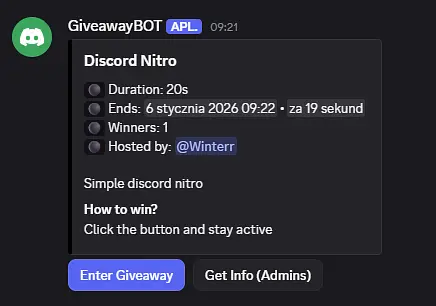
In this final stage, I focused on the server logic. It was quite challenging, but I managed to get it done. I even pulled an all-nighter haha. I also improved the index file a bit and updated some commands I had added earlier, but everything works perfectly. I don’t remember if I mentioned it before, but I removed deploy-commands and integrated it into the index because it was a bit overkill. btw. interactionCreate.js took about 800 LINES in peak but i optimised it
Below, I’m sharing a video showing how it all works. Thank you, everyone! ;) (Idk why i made utils folder but this is my musthave in every project) I know it’s too long devlog. in case of anything, cut my time
Log in to leave a comment
In an earlier devlog, I wrote that I had started working on the code architecture design but that was just prototype. I’ve finished it. I wrote a complete code for events and all functions. It’s not the giveaway logic yet, but the code turned out really well. It was a long session because I’m not a vibecoder and I don’t use ready-made sources; I really want to dive into these things.
I also added a cool index.js that automatically detects issues, loads events and commands, so you don’t have to do anything—everything happens automatically. Also i made “frontend” for giveaway command. now im going to make logic for giveaways
Log in to leave a comment
First Advanced Setup ;)
Set up a Discord.js bot using Node.js and dotenv for environment variables.
Created a structured command handler: commands are organized in folders, loaded dynamically into a Collection.
Implemented permission checks for commands to restrict access to admins.
Added logging for loaded commands and bot login status.
Created a function to deploy slash commands automatically on startup, with proper checks for client, commands, and environment variables.
Fixed issues with client.commands being undefined during deployment by passing the client object correctly and checking the collection size.
Ensured interaction handling works only in servers and replies gracefully on errors.
Consolidated code for clarity: removed duplicate requires, merged duplicate functions, and improved readability. But this is all a prototype code so it will work bad and it took not enough time
Added optional deploy-on-start feature controlled by an environment variable.
Log in to leave a comment
In the first stage, I started creating the index.js file for the bot, but in the end I decided to skip it. In the next stage, I will increase the bot’s level of advancement and divide the project into folders so that programming is more enjoyable for me and the entire project structure and code are better written and more organized.
Log in to leave a comment