Ok so I don’t have much to say right now other than I messed up a little bit. Every change I made in the last 2 hours (which I got the AI model from taking 30 seconds to ~5 seconds) and the changes I wrote about in the last devlog have been deleted because I accidentally overwrote everything… luckily everything else was on github :). I am going to use git every like 10 minutes from now on.
9 hours ago that commit was 

0
Log in to leave a comment
Ok so I added a few things:
- I got the app running on my phone, which took a lot of work, I had to fix xcode and some flutter and a bunch of things. I got all the weird bugs (mostly) fixed.
- I made the UI much more consistent everywhere by extracting shared components and overall improving the UI.
- I made the statistics on the profile page properly update and the badges tick up.
- I aded a recent sightings tab that shows for the new species you have discovered all of the photos of them.
- Added a few animations to polish things up


0
Log in to leave a comment
What I worked this time was a park field guide.
What it is a list of species that can be found in a national park (I may expand this later to just a region, but for now national park is good).
For a demo run I used yellowstone national park and took the data from the national parks service website. I inputted all the scientific names in a JSON list tied with the park, and thats how I save the data.
The JSON is then read and rendered as a list for each park, and when you travel there you goal is to see how much you can fill up! Its like a little collection goal.
The first attachment is a video showing off the system. The second is a screenshot of how the JSON is to be formatted.
Also I worked on a lot of small optimizations for the app. I added a cache for the species such that the app doesn’t have to parse the JSON each time is loads in, instead it can refer to the cahce. I also updated the way the JSON was read to make it more optimal for making the taxa detail screens, as before it just looped through all species to search for matching ones, now it uses a map.

0
Log in to leave a comment
Added a profile screen that shows your rank and badges and some stats.
Also added the badges screen.
There is an “xp” system for the badges, where each rarity gives a different amount and that takes you through the ranks. The rank cutoffs are:
if (points >= 220) return 'Mythic';
    if (points >= 150) return 'Master';
    if (points >= 100) return 'Expert';
    if (points >= 60) return 'Tracker';
    if (points >= 30) return 'Naturalist';
    if (points >= 10) return 'Explorer';
    return 'Novice';
And the point values per rarity are:
- Common: 1
- Uncommon: 2
- Rare: 3
- Epic: 5
- Legendary: 10
- Mythic: 20
So yeah, very quick update with that new screen. Some of the statistics btw are like blank / hard coded rn, I need to code in the system to actually record them and then tick up the badges.


0
Log in to leave a comment
I started to work on a new system: Badges.
The goal of badges is simple, it is to make the app more addicting and fun to use, and hopefully to get more people using it for longer.
I added a few badges you can earn, but the main thing I worked on was the system to handle them. There are the following rarities of badges:
- Common - Light blue(Used to be grey but I used that to like show unclaimed ones, so color is prone to change
- Uncommon - Light Green
- Rare - Blue
- Epic - Purple
- Legendary - Amber
- Mythic - Pink
Yes, I stole the rarities and colors from hypixel skyblock…
I also made a way to denote the badges using JSON, created a few types like discover X species / families / orders and more. I’m going to expand this system more with like xp and ranks.


0
Log in to leave a comment
I worked on the search feature. So the way it will work is when on the main screen you can search by two things: species names and family names. For example, if I type Canis it will filter any family whose name doesn’t match that, and it will filter any family that doesn’t have a species with that name. If for example I search Tiger, it will show Felidae (cats), and it will then highlight the card that is tiger in amber, and move that card to the top of the family so I can quickly get it. Pretty cool I think.
0
Log in to leave a comment
Worked on a few main things:
- First, I noticed from the last iteration that some of the parsing wasn’t that great. For example, on the lion page, and for any animal, when parsing taxonomy, it parsed most of them right from wikipedia using the scientific names like Chordata and Felidae, but for things like Animalia and Mammilia, since it was parsing a hyperlink off of wikipedia, my code defaulted to not parsing the name of the link, but the name of the page it linked to. This lead to it parsing Animalia, which linked to the page animal, as animal. I updated the parser to fix this, but I need to rerun it over night now to let the update set in.
- Just like I before added that family detail screen, where you could click on a family card and see all the species in it and a little description of that, I added something similar to all levels of taxonomy so you could see subtaxa. For example you can see the attached video to see these new screens.
- I identified a good model to use, SpeciesNet by Google, which is an AI image recognition model for camera traps, but works well for my case. It consists of a model that creates a bounding box around an object / animal, and then another model that identifies that animal. I created a basic fast api application to wrap this model so my app can later make a call to it requesting to identify the image it sees.
0
Log in to leave a comment
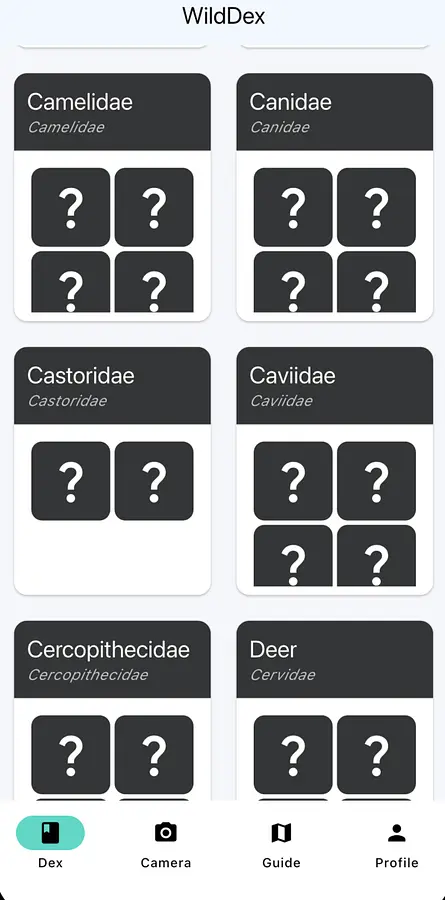
I started working on the flutter app itself and updated the parser to format the data a little better. I also moved the species images and range images to a Google cloud storage bucket instead of keeping them local as that greatly decreased bundle size. I kept the species json local in case you want to see it while offline. I went through many many interactions on how to display the dex screen, as Pokémon only have a small amount that can really be in any random order, but we have tens of thousands of animals and sorting matters. What o decided to do was to instead of making each species a card, I grouped them by taxonomic families, like felines and canines, and made each of those a card and sorted those by class (reptile, mammal, bird, etc). On each family card you could see a few species (4 of them to give an idea). If it wasn’t discovered it’s a question mark, otherwise it renders the species image. I also choose a fun font, main color (light blue my favorite), and added a few animations to make it look more polished. I am very happy with how the dex screen turned out. I also worked on designing a few others, but I’m still working on those so I’ll log those later.
The main challenges I ran into this were two fold: just getting the app to run on iOS simulator was a pain(I tried to get it running on my phone but it didn’t work), and when installing Xcode and iOS 26 simulator on my Mac I ran out of storage and had to delete hollow knight :(
Anyways very fun so far!
0
Log in to leave a comment
Today I worked on the basic parser. I gathered a really long list of species scientific names and then used wikipedia to scrape to get the following information:
- A basic description (First paragraph of wikipedia)
- An image
- ICUN Redlist status (Endangered, Vunerable, etc)
- Full taxonomy
- Range map (if provided)
- Common Name
Sometimes the pages were finicky and the data was presented in different ways, so making the parser fully work was kinda a pain. But now look at that beautiful JSON data!


0
Log in to leave a comment